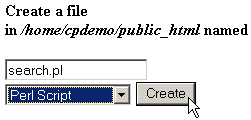
For
small text files it can be easier to create them online, rather
than on your home computer and uploading the file. You can create
text files, such as HTML, PHP, or plain TXT, but not binary files.
To
create a new file:
-
Navigate
to the folder where you want to create your text file.
-
Click
on the Create New File link.
-
Enter
the name of the file to be created in the available field in
the top-right corner of your window. You do
need to add the file extension to the name, for example script.pl
for a Perl script, not just script.
-
Select
the type of document from the drop-down list. Each type of file
adds specific information to the text file:
-
Text
Document - No text is added to the file.
-
HTML
Document - No text is added to the file.
-
Perl
Script - Automatically adds the path to Perl to
the top of the file. Make sure to double-check that the
path is correct.
-
Shell
Script - Automatically adds the path to the Shell
executable to the top of the file. Make sure to double-check
that the path is correct.
-
Click
on the Create button. The file has now been
created and the display updated to show the new file. Refer
to Editing a file to add text
to these new files.
|
|