
web hosting india

Most Reliable and Reputable Web Hosting Company in India Since 1998   
Creating a MySQL user

You need to create a MySQL user before that user is able to use the database. This does not automatically allow the user to use a database - you need to grant that user permission to the specific database first. Refer to Grant a user's permissions to a MySQL database for more information.

To create a MySQL user:
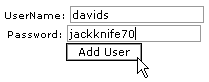
  1. Click on the MySQL databases button on the home page.

  2. Enter the user's name in the UserName field and the user's password in the Password field.

  3. Click on the Add User button.

Creating a MySQL user

Topics:

Removing a user


Live Sales Chat
Esteemed Clients
clients
Web Hosting Specials

Linux Hosting : 5 GB @
2,499/year
- Promotional Code OCTLIN09
Read More || Order Now

Windows Hosting : 2 GB @
1,999/year
- Promotional Code OCTWIN09
Read More || Order Now


- Domain Name Transfer
- Mailing Solutions
- Special Promotions
- Cpanel Help
- View Payment Options
- Affiliate Program


we accept credit cards

paypal accepted

We accept all the major cards


Web Hosting Articles || Web Hosting Glossary || Domain Name Articles || Free Tools || FTP Tutorial || User Policy || FAQ || Resources || Spam Policy

Web Hosting Company, Reseller Linux \ Windows Web Hosting India, Domain Name Registration

All material ©1998-2009 Webcom Systems. All Rights Reserved.