|
Changing
file/folder permissions
|
All
files on UNIX (including Linux and other UNIX variants) machines
have access permissions. These tell the operating system how to
deal with requests to access these files. There are three types
of access:
-
Read
- Denoted as r, files with read access can
be displayed to the user.
-
Write
- Denoted as w, files with write access can
be modified by the user.
-
Execute
- Denoted as x, files with execute access can
be executed as programs by the user.
Access
types are set for three types of user group:
The
web server needs to be able to read your web pages in order to be
able to display them in a browser. The following permissions need
to be set in order for your web site to function properly.
-
All
HTML files and images need to be readable by others. The setting
for this is 644 (readable by User, Group, and World, and writable
by User), and is set automatically when you upload files.
-
All
folders need to be executable by others. The setting for this
is 755 (readable by User, Group, and World, writable by User,
executable by User, Group, and World), and is set automatically
when you create a folder.
-
All
CGI files (all files in the cgi-bin folder)
need to be executable by other. The setting for this is 755
(readable by User, Group, and World, writable by User, executable
by User, Group, and World), and is not set
automatically when you upload files. You need to change file
permissions manually. Refer to the Introduction
to CGI topic for more information.
Warning:
It is important that none of your files or folders are
writable by anyone else. Any file or folder which is writable by
others can be erased by them. Generally there is
no problem, just be careful how you set your permissions.
To
change file or folder permissions:
-
Navigate
to the file or folder that you need to change.
-
Click
on the name of the file or folder.
-
Click
on the Change Permissions link in the top-right
corner of the window.
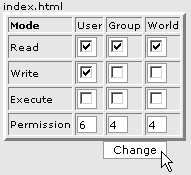
-
Click
on as many tick boxes as you require to create the right permission.
The permission numbers underneath the tick boxes will update
automatically.
-
Click
on the Change button when you have finished setting the permission.
The new permission level has now been saved and the display
updated to show the modified file.
|
|