An
FTP account creates a folder on the public_html
level of your site that allows external users that know the password
to upload and download files from that location. Change your password
if you think that your account is being used incorrectly.
Note:
Please be aware that all users with the correct password
will be able to add, edit, and delete files from the directory that
you specify for the FTP account, and any directories within the
stated directory.
To
add an FTP account:
-
Click
on the Ftp Manager button on the home page.
-
Click
on the FTP Accounts link.
-
Click
on the Add Account link.
-
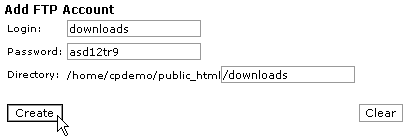
Enter
the name of the FTP account in the Login field
and the password for the account in the Password
field.
-
Enter
the path to the directory to which this FTP account has access.
Warning:
If you enter the top-level of the web site by entering
a slash (/), all users with the correct password
will be able to add, edit, and delete all files
on your site. It is advisable to limit an FTP account to a smaller
section of your web site.
-
Click
on the Create button.
|
|