OpenPGP
is a tool for secure online communication. CPanel uses GnuPG for
its public-key cryptography so that users may communicate securely.
Each person gets a pair of keys, called the public key and the private
key. Each person's public key is published while the private key
is kept secret. Messages are encrypted using the intended recipient's
public key and can only be decrypted using their private key.
General
documentation and comprehensive user guides are available at the
GNU Privacy
Guard site.
To
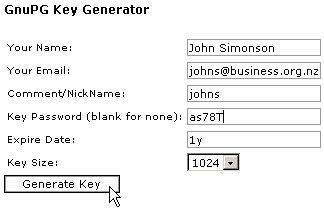
generate a public and private key:
-
Click
on the Manage OpenPGP Keys button on the home
page.
-
Click
on the Add Key link.
-
Enter
your name, e-mail address, and nickname in the Your
Name, Your Email, and Comment/NickName
fields.
-
Enter
the password for the key in the Key Password
field.
-
Enter
the expiry date for the key in the Expiry Date
field. You can suffix the entered number with the following:
-
y
= year
-
m
= month
-
w
= week
-
d
= day
-
Choose
the size of the key that you want to generate in the Key
Size field. 1024 bytes is a common size.
-
Click
on the Generate Key button. Note that it may
take a few minutes to generate the key, depending on its size.
|
|