
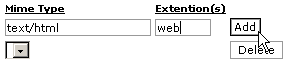
MIME types tell browsers how to handle specific extensions. Most MIME types are set globally on the server. For example, the text/html MIME type equates to htm, html, and shtml extensions on most servers, and this tells your browser to interpret all files with those extensions as HTML files. You can alter or add new MIME types specifically for your site (note that you can not alter the global MIME type values, only add to them). MIME types are often used to handle new technologies as they appear. When WAP technology first appeared no one had these extensions set up on their server. With MIME types, however, you could have set it up yourself and begun serving WAP pages immediately. Warning: Make sure you check the list of pre-existing MIME types before adding new ones. Check with your hosting administrator before adding a MIME type, as they can easily alter the correct functioning of your web site. Note: People often get confused as to the difference between MIME types and Apache handlers. Basically, MIME types tell your browser how to handle files, while Apache handlers tell the server how to handle files. To add a MIME type:
 Topics: |
|
|
| |